
On this page
The short version
- Three AI-agent capabilities shipped within about a week in mid-2026, Gemini Spark's Chrome auto-browse, Ask Maps agentic food ordering, and a 30,000-conversation voice retail agent, and the first two act inside a person's own signed-in browsing session.
- Every popular method for measuring AI-agent traffic, including the taxonomy behind this site's own AI-crawler log, works by matching a self-identifying marker in the user agent string or a published IP range.
- Recomputing this site's 22-day AI-crawler log found zero of 134 distinct user agents present as an unmarked, ordinary Chrome browser, because the collection script is built to drop that exact pattern as human traffic before it ever reaches the file.
- No dataset here can produce a detection rate for signed-in agent traffic; what a real signal would require, unusual timing, form-fill cadence, and missing mouse or scroll behavior, is reasoning about a method, not a validated one.
In about a week this summer, three AI agents crossed the login wall. Because it can drive a real Chrome browser using a person’s own saved passwords and logged-in accounts, Google’s Gemini Spark can now book an apartment viewing or start a flight purchase without anyone touching a keyboard.1 On Google Maps, the Ask Maps assistant can now order takeout for a shopper and add it straight to their cart.2 A voice agent built by avatarin on OpenAI’s GPT-Realtime handled roughly 30,000 shopping conversations for a Japanese retailer in a two-week public campaign.3 For every popular method of measuring AI-agent traffic, detection depends on the agent identifying itself, either through the text string it sends as its own browser identity or the IP address it arrives from. A person’s own signed-in agent does neither, which makes it exactly the traffic everyone most wants to size and exactly the traffic no instrument was built to see.
Across 134 distinct user agents in 22 days of this site’s own AI-crawler log, not one looks like an unmarked, ordinary Chrome browser, because the logging script drops that exact pattern as human traffic before it is ever written down.
What just started happening to AI agents and the login wall?
Within about a week of each other in late July and early August 2026, three separate AI-agent capabilities shipped. One drives a Chrome browser through a person’s own saved logins. Another orders food straight into a shopper’s cart. And a third is a production voice agent that has already handled tens of thousands of live shopping conversations. Within a person’s own signed-in session, two of those three, Gemini Spark and Ask Maps, act instead of arriving as an outside visitor.
Gemini Spark’s Chrome integration, announced July 30, lets the assistant use “your logged-in accounts and saved passwords to handle tedious web errands, like scheduling viewings for apartments you’ve saved or researching flight options and starting the booking process,” while keeping payments and other sensitive steps in a human’s hands.1
Ask Maps, updated August 6, can now take an order like “spicy pad kee mao with seafood” and add the dish directly to a shopper’s cart at a partner restaurant, with Uber Eats support coming soon.2 Once built on OpenAI’s GPT-Realtime for the Japanese retailer Yamada Denki, avatarin’s voice agent guided shoppers toward a purchase decision across roughly 30,000 conversations in a two-week public run.3
Only the first two put the agent behind an actual login. The third is a first-party conversational agent on the retailer’s own site. It never involves a visitor signing into someone else’s account. This piece is about the first kind, an agent presenting credentials that belong to the person it is acting for.
How does everyone currently measure AI-agent traffic?
Every widely used method, including the taxonomy behind this site’s own AI-crawler log, works by matching a recognizable marker inside the user agent string, such as “GPTBot” or “compatible; Googlebot,” and, for stricter checks, the IP address a request arrives from against a published list. Google’s own reference documentation for its crawlers and fetchers follows the identical pattern.
This site’s own collection script applies the same logic, keeping a request only when its user agent matches one of roughly 40 known markers and dropping everything else as an ordinary human visit. Google’s documentation for how its own crawlers and fetchers identify themselves is built the same way.
The reference page covering “user-triggered fetchers,” tools that act on a signed-in user’s request, lists a token called Google-Agent, described as software “used by agents hosted on Google infrastructure to navigate the web and perform actions upon user request.”4
Google-Agent sends a “compatible; Google-Agent” string in every request and runs from IP ranges Google publishes. A site owner can confirm those with a reverse DNS lookup, checking which hostname an IP address actually resolves back to, and expecting a google-proxy-*.google.com result.5
Beneath all of this sits a premise I’ll call the marker assumption, the working bet that automated traffic will volunteer a distinguishing signal instead of hiding in plain sight. Google’s own Google-Agent token satisfies it. Nothing about Gemini Spark’s Chrome integration says it does.
Why does a signed-in Chrome agent break that method?
Because its request never carries a marker or arrives from a published address in the first place, a signed-in Chrome agent breaks the marker assumption. Gemini Spark’s own description of what it does, drive Chrome using a person’s own saved passwords and logged-in accounts, describes automation running inside a user’s real browser on the user’s own device, not a fetch dispatched from a Google-owned server.
This is my read, not something Google’s documentation states directly, so I am labeling it as inference rather than a confirmed fact. Google’s published Google-Agent token belongs to agents “hosted on Google infrastructure,” with IP ranges drawn from a file Google maintains and a hostname that resolves back to Google.4
While the Gemini Spark announcement never mentions a distinguishing network-level signal of any kind, nothing in that description covers a feature acting through a person’s existing Chrome profile on the person’s own machine.1
The reasonable read is that a Spark-driven errand leaves from the same device, the same residential or office IP address, and the same Chrome build as the person’s own ordinary browsing, because the entire point of using saved logins and saved passwords is to authenticate exactly like the account’s owner.
Does this site’s own AI-crawler log have a bucket for signed-in Chrome agents?
No, and the absence is provable rather than assumed. Recomputing the user agent breakdown from this site’s own 22-day AI-crawler log turns up 134 distinct user agents across 11,542 logged requests, and every single one carries a self-identifying token: a bot name, a contact URL, or a known tool signature. Not one looks like an unmarked, ordinary desktop Chrome string.
That absence is not a coincidence of who happened to visit during these 22 days. It is built into the collection code. scripts/ai-crawler-log.mjs, the script that assembles the log, keeps a request only if its user agent matches one of a fixed set of known markers, and its own source comment names the alternative outcome plainly.
Anything that matches none of them is logged internally as a “human browser / non-bot” and dropped before the row is written. Precisely what Gemini Spark’s Chrome integration would produce, an agent presenting Chrome’s own real, unmarked user agent string, matches that description exactly. The collection step discards it there; nothing downstream ever gets the chance to miscategorize it.
Even inside the rows that do survive collection, the production taxonomy that sorts them, scripts/crawler-classify.mjs, assigns every request to one of seven buckets: search, AI training, AI search, AI assistant, social, SEO tools, or a catch-all “Other.”
A third of all logged requests, 33.9%, already land in “Other,” and every user agent inside that bucket is still self-identifying on inspection, an unfamiliar crawler like jscrawler or l9scan, a security scanner, or spoofed pingback traffic naming a WordPress install this Astro site does not run.
None of the seven categories, and none of the markers feeding them, has any way to catch a request that looks like plain human Chrome. That is not a gap in the categories. It is what the categories were built to exclude.
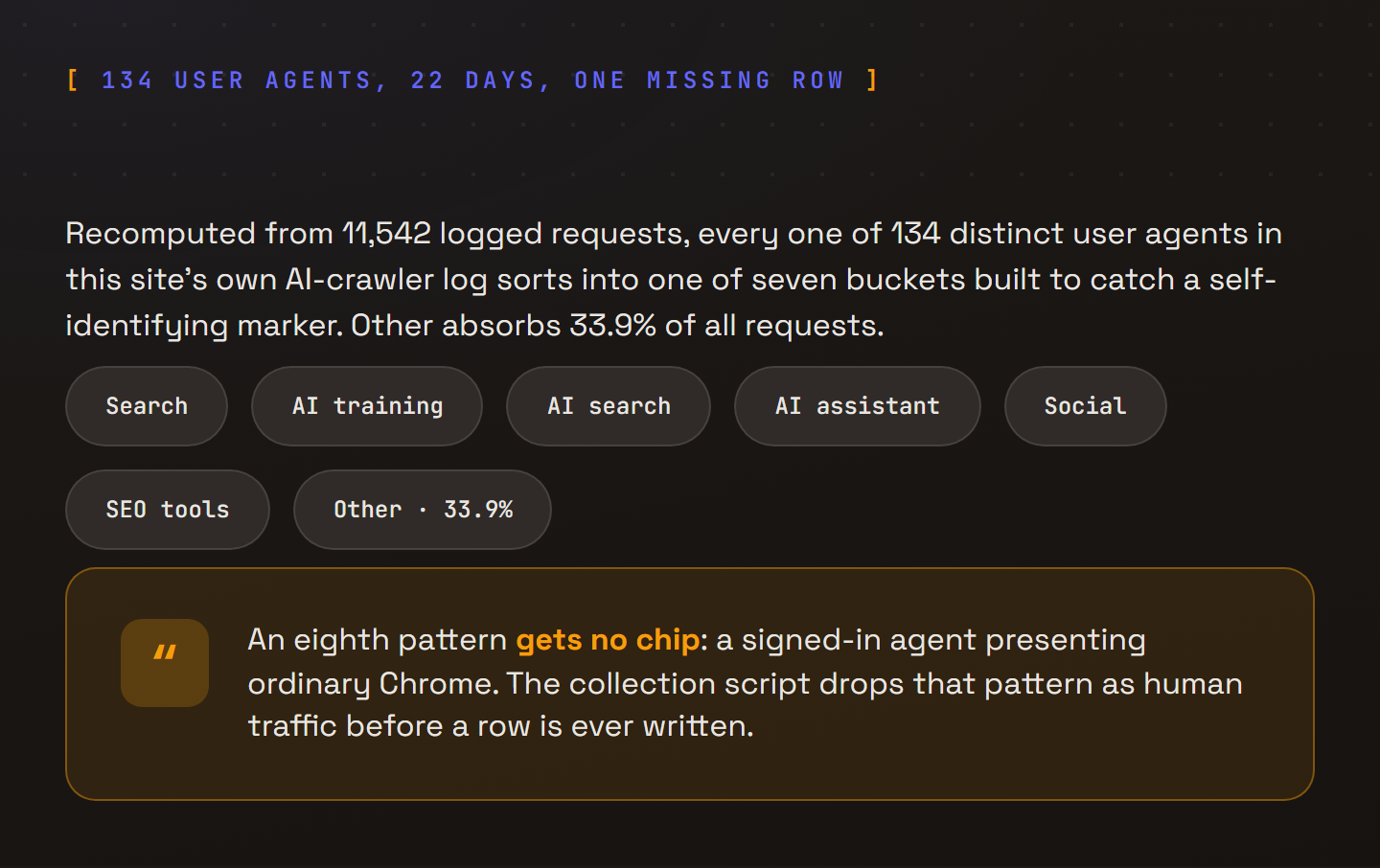
Recomputed from this site’s own 22-day AI-crawler log; the callout is not a measured category, it is the gap the collection script produces by design.
Why can’t a detection rate be estimated from the AI-crawler log?
A detection rate cannot be estimated because the AI-crawler log’s own bot-marker filter excludes the candidate traffic before a row is ever recorded, rather than after. Because the AI-crawler log only stores rows that already cleared the bot-marker filter, there is no denominator anywhere in this data for how many logged “human” pageviews are actually a signed-in agent. Manufacturing a share from a file that structurally excludes the thing being measured is not a number this data can support.
Across Search Console, Google Analytics 4 (GA4), and any CDN’s own bot-classification dashboard, the same limit applies, since all three lean on the same kind of user agent or IP heuristic somewhere in the pipeline. What a real number needs is a different instrument, one built on server-side session behavior rather than a user agent log, and no dataset available for this piece measures that.
What would a real detection signal actually have to look like?
No test has confirmed that behavioral markers actually catch a signed-in agent, so what follows is reasoning about what a working signal would require rather than a validated method. Because user agent and IP address are structurally useless against a signed-in browsing agent, a real signal would have to live in interaction behavior instead: how fast someone acts, how evenly, and whether the small physical noise of an actual human hand shows up at all.
Among the plausible candidates are four behaviors. One is timing that beats a human reaction floor, a form completed faster than its fields could physically be read and typed. Check, too, for form-fill cadence with no inter-field latency, each field landing at a mechanically even interval instead of the pauses a person takes while thinking or checking a card.
A third is missing mouse-movement entropy on a session that still converts, a purchase completed with no cursor drift, no hover, no idle scroll. And the fourth is a navigation path with no scroll events at all, arriving at a buy button through jumps between page states rather than a read.
Consider it like a store greeting card that has clearly never been picked up off the shelf, no crease, no fingerprints, no sign anyone actually handled it before it left.
The analogy breaks in an important way, since a card with no fingerprints is evidence someone skipped a physical step, while a converting session with no scroll or mouse movement could just as easily be a human using assistive technology, a keyboard-only power user, or someone on a slow connection that never fired the events at all.
By itself, none of these four behaviors is a clean tell, and this piece has not tested whether any of them holds up against real traffic.
What can a practitioner check in their own analytics today?
Look for a session that converts with zero scroll depth, or a completed form where the average time between fields sits under what a human needs to move a hand and re-read a label, roughly a quarter of a second per field. Most analytics platforms, including GA4, already log scroll depth and per-field timing if the underlying events are wired up, so this is a query against data most sites already collect rather than a new instrument to build.
This sits next to two things I have already argued elsewhere. In an interpretability finding for checkout agents, the composed-versus-desperate divergence is a different blind spot in the same family. A model’s output can look calm while its internal state drives the opposite behavior, the same way a signed-in agent’s traffic can look human while its intent is automated.
In Anthropic’s usage data as a demand signal, not a jobs report, the shift I described assumed usage telemetry could still see the thing it was counting. An authenticated browsing agent is the case where it structurally cannot.
Neither the agent’s own builder nor the site it visits can answer “how much of my traffic is a signed-in agent” today. That answer waits on a check built from behavior, not headers.
Terms defined here
- The marker assumption. The working premise behind every popular method for measuring AI-agent traffic, from a site's own user-agent log to Google's published crawler lists, that automated traffic will volunteer a distinguishing signal, a name in the user agent string or an address on a published IP list. An agent signed in with a person's own credentials has no reason to carry one, and every reason not to, since the task requires it to authenticate as if it were the account's human owner.
Sources
Google; OpenAI; brandonlazovic.dev AI-crawler log.
- Google: Gemini Spark now integrates with Chrome (Google Blog, July 30, 2026)
- Google: Ask Maps gets more helpful with food ordering and more (Google Blog, August 6, 2026)
- OpenAI: How avatarin built a 24/7 retail agent with GPT-Realtime (July 30, 2026)
- Google for Developers: List of Google user-triggered fetchers
- Google for Developers: Verify requests from Google crawlers and fetchers
Related reading
From the Daily Pulse
This piece elsewhere
Explore with