
On this page
The short version
- Google sunsets the Content API for Shopping on August 18, 2026, and stores still calling it will see their Shopping ads and free listings degrade and drop out in the weeks that follow.
- The failure is a stale-data cascade, not a same-day kill switch: once the API stops responding, product data can no longer update, so items expire and get disapproved, and only then do listings fall out.
- You can check your own exposure in about five minutes by enabling API diagnostics under Merchant Center add-ons and reading the API version column to see which methods still call Content API and how heavily.
- Direct and custom integrations must migrate by hand; Shopify and WooCommerce native Google channels typically handle it for you, but third-party feed apps migrate on each vendor's own timeline.
Google will shut off the Content API for Shopping on August 18, 2026, less than five weeks from this writing. If your store still depends on that API to manage its product data and you have not migrated to the Merchant API, your Shopping ads and free listings will degrade and fall out of Google in the weeks that follow.
The Content API for Shopping sunsets August 18, 2026. Merchants still calling it lose the ability to update product data, and stale listings drop out.
What is being deprecated in the Content API for Shopping, and what replaces it?
The thing sunsetting on August 18 is the Content API for Shopping, version 2.1: Google’s long-standing programmatic interface for managing Merchant Center product data, inventory, and account settings.1 Its replacement is the Merchant API, which Google calls the official successor.3
The difference is structural, not cosmetic. The Content API was a single monolithic API. The Merchant API is a collection of smaller sub-APIs, including Products, Inventories, Reports, Accounts, and Data Sources, that version and ship independently.3
Merchant API reached general availability around July 2025,4 roughly a year after it entered beta in mid-2024,7 which means the successor has been production-ready for about a year already. One clarification worth making: this deadline is specifically about the Shopping Content API, the one that feeds your product listings, not a catch-all for every Google API your store might touch.
What actually happens to your ads and free listings after August 18?
Google switches off the API, not your account, and your listings decay from there in what is best understood as a stale-data cascade. Once the Content API stops responding, any integration built on it can no longer send updates to Merchant Center; prices, availability, and new products stop syncing.
From there the decay is ordinary Merchant Center behavior: product data goes stale, items pass their expiration and get disapproved, and disapproved or expired products fall out of Shopping ads and free listings.
That mechanism is why the common shorthand, that ads simply “stop working” on August 18, is misleading. The switch-off is real, but it acts on the data pipe, not on your ad account, so the timing of the damage depends on your catalog.
My read, and I label it as inference: the stale-data cascade is not confined to a single day, which cuts both ways. A catalog with slow-moving inventory might limp along for a little while after the 18th. A catalog with frequent price and stock changes breaks almost immediately, because those updates are exactly what stops flowing. Either way, the fix has to be in place before the deadline, not after it.
How do you check Content API exposure in five minutes?
Google added a report inside Merchant Center that tells you exactly which API versions your account is calling. It is an add-on you have to switch on first. The walkthrough and screenshots below come from Brodie Clark, who flagged this self-check on LinkedIn.8
- Log in to Google Merchant Center.
- Open Settings and go to the Add-ons tab.
- Find the API diagnostics card and click Add to enable it.6
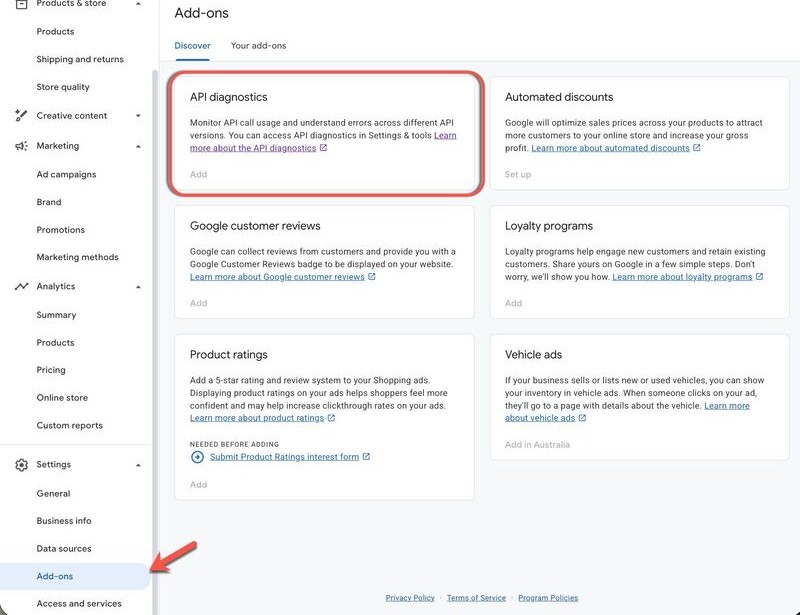
- Once enabled, open API diagnostics and review the report.5
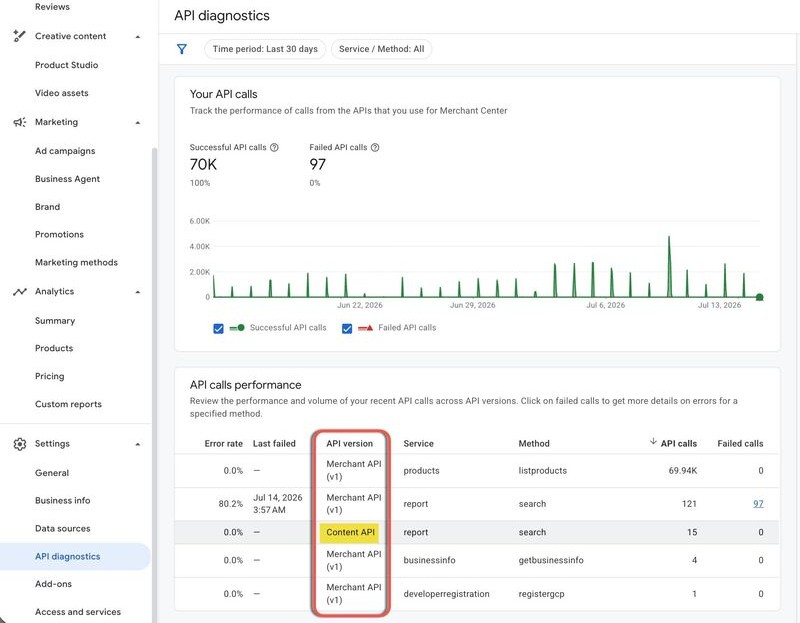
The column to watch is API version. It labels every call as either Content API or Merchant API (v1), broken out by service and method. If every row already reads Merchant API, you are done. If any row reads Content API, that integration is on the clock.
How do you read the API diagnostics report, and how do you know if it’s urgent?
The API diagnostics report does not just tell you whether you are on the Content API; it tells you how much you depend on it. Each row shows the number of API calls for a given service and method, and that call volume is your triage signal. Call this the call-volume triage read: rank your Content API rows by call count, because volume is a proxy for how much of your product pipeline still runs through the old API.
A Content API method firing tens of thousands of calls is a load-bearing part of your product-generation pipeline. A method firing a handful of calls is a minor dependency. In the screenshot above,8 the account’s product listing runs entirely on Merchant API (v1) at roughly 70,000 calls, while the only remaining Content API usage is a single report/search method at 15 calls. That is a nearly-migrated account with a low-urgency straggler to clean up.
Sort your own report the same way. The high-volume Content API methods are the ones to plan a migration around first, because they are doing the real work of getting products into Merchant Center. The low-volume ones are the stragglers you can clean up afterward.
Do you have to migrate your integration, or does your platform handle it?
Whether this deadline requires action from you depends on who runs your integration: direct or custom builds must migrate by hand, Shopify and WooCommerce native Google channels usually handle it for you, and third-party feed apps migrate on their own vendor timeline. The breakdown below sorts the three cases.
- Direct or custom integrations. If your team built the connection to Merchant Center, or a developer maintains it, that code has to be rewritten against the Merchant API. This is the group that must act.
- Platform-native channels. Merchants using Shopify’s Google & YouTube channel or WooCommerce’s Google Listings & Ads generally do not manage the API themselves; the platform controls that integration and updates it. My read, labeled as inference: this is the likely default for most small and mid-size merchants, but confirm your channel or app is current rather than assuming it.
- Third-party feed and app integrations. Feed tools and Shopping apps, for example Feedonomics, Channable, or DataFeedWatch, migrate on their own schedule. Most enterprise-grade tools will handle it well before the deadline, but the timeline is the vendor’s, not yours, so ask them directly.
The API diagnostics report is what settles the question for any of these cases. If it shows Content API calls, something in your stack is still on the old API, whoever built it.
What does migrating to the Merchant API involve?
Migration is a re-architecture, not a version bump, which is the main reason not to leave it late. The Merchant API is not the same endpoints under a new name. Product identifiers change from bare numeric IDs to resource names, for example accounts/123456/products/en~US~sku123; the host changes to merchantapi.googleapis.com; and functionality is split across the independent sub-APIs rather than a single surface.3
The one piece of good news for planning: the Content API and Merchant API can run in parallel until the sunset, so a team can build and test the new integration alongside the old one before cutting over.3
For a small store on a managed platform, all of this is invisible. For anyone running custom code, treat it as a development project with a hard deadline, not a configuration change. This section is orientation only; Google’s Merchant API documentation is the actual migration reference.
Why does a five-minute Content API exposure check matter more than a deprecation notice?
Checking your Content API exposure deserves a PSA, not a shrug, because of timing asymmetry: the check takes five minutes, migrating a custom integration takes weeks, and the two are separated by a hard date. The worst version of this is discovering on August 19 that a high-volume Content API method was quietly running your entire feed.
Run the API diagnostics report this week. If it comes back clean, you have lost five minutes. If it does not, you have found the problem with enough runway to fix it. And once you have checked your own store, tell the other merchants you know to check theirs; the ones most likely to get caught are the ones not following API deprecation notices in the first place.
Terms defined here
- Stale-data cascade. The failure mode when a deprecated feed API is sunset: the merchant account is not switched off, but product data can no longer update, so items go stale, pass expiration, and get disapproved, and only then do listings fall out of Shopping ads and free listings.
- Call-volume triage read. Prioritizing an API migration by reading the per-method call counts in Merchant Center's API diagnostics report: high-volume Content API methods are load-bearing and migrate first, low-volume methods are stragglers to clean up afterward.
Sources
Diagnostic walkthrough and screenshots via Brodie Clark on LinkedIn. Sources: Google Merchant Center Help; Google for Developers.
- Google Merchant Center Help - Introducing the Merchant API (successor framing; August 18, 2026 sunset date)
- Content API for Shopping release notes (sunset notice and extension request process)
- Merchant API overview (modular sub-API structure; resource-name identifiers; parallel-run guidance)
- Merchant API latest updates (v1 general availability; v1beta discontinued February 28, 2026)
- Merchant API usage metrics and diagnostics (developer guide)
- Google Merchant Center Help - API diagnostics add-on
- Google Ads Developer Blog - Announcing the Merchant API beta (July 2024)
- Brodie Clark - LinkedIn post on the Content API sunset and the API diagnostics self-check (source of the walkthrough and the two screenshots)
Related reading
From the Daily Pulse
This piece elsewhere
Explore with